Showing posts with label Computer. Show all posts

Friday, June 11, 2010

Add Your Own Background Image to Google

Google Background

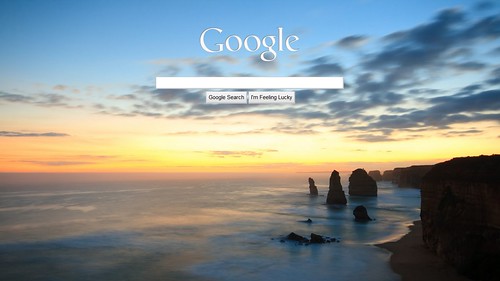
Now you can add your own background image in Google homepage! Just click on "change background image" and choose an image either from your own computer or from one of the choices given by Google, and you will enjoy your new background in no time.

Before trying it out I thought this is quite a useless cosmetic thing, but after plugging in my recent Great Ocean Road shot (pictured above) it worked very well, and I am in love with it :) The fact that the Google symbol and the search bar is located amongst the clouds is quite symbolic of the whole "knowledge in the cloud" idea of the Internet too.

Try it out and see whether you like it as much as I do!

1 comments:

Wednesday, November 11, 2009

Kill The "Do You Want to Restart Now" Nag

I am sure this is not new to geeks like See Hua, but I discovered this convenient trick to get rid of one of the many annoyances in Windows. If you have spent some time with Windows (any of the recent versions including XP, Vista or 7), you would most likely have come across this lovely dialog:


You click on "Restart Later" hoping that it would go away; but no, it keeps coming back to you like a nagging aunt. Some days your machine gets more impatient, and it shows you this version instead:


Sometimes it's even worse, where the option "Restart Later" is grayed-out and you can do nothing except to watch your computer restart in horror.

Now, imagine that this happens in the middle of watching your favourite movie, or presenting your powerpoint slides. Should we let Windows take us hostage for its "restart now" compulsion? Of course not. There's an easy way you can kill off this nagging dialog when it appears.

Here's what you do. The following instruction is for Windows XP only, for Windows Vista or Windows 7 please refer to this page.

1. Go to Start --> Run
(for those who like keyboard shortcut, you can also use the combination "Win + R")


2. Type net stop "automatic updates" then Enter.


3. You will see the Command Line window for a brief second and voila, the nagging dialog would be gone. You don't have to worry about the update not being installed because the Windows will still install it automatically the next time you restart your computer.

That's it, a public message by CY.

3 comments:

Friday, December 19, 2008

How to Fix Slow Scrolling in Firefox

Many Firefox users including myself have been complaining about slow, choppy scrolling when they visit certain websites. For example, with the recent redesign, ReCom has been scrolling pretty choppily for me. Another example is this forum and this university website.

Apparently, the slow scrolling is due to the presence of a fixed background image in the web page. In the case of ReCom, there is a fixed background blue gradient. For the second forum, it is the giant globe, and for the university website, it's the pretty orange intersecting lines.

Interestingly this problem doesn't affect all versions of Firefox and all machines in which Firefox is used. But if you happen to be one of the unfortunate users, fret not - a fix is just a click away! This is a bookmarklet you can drag to your bookmark folder or save as a bookmark (found here):

Zap Background!

Whenever you visit a problematic website, just click on this Zap Background bookmarklet and the problem will be solved instantaneously! How does that work? Basically it just tells Firefox to stop displaying the problematic background, so it could scroll smoothly again.

If you don't want to click on the bookmarklet every single time, there are more methods you could employ that solve the problem once and for all but involve some tweaking:

1. If the problematic website is one that you visits regularly, you could tell Adblock (if you have it installed) to block the problematic background image altogether. To find out the URL of the background image, just right click on the background and "view background image". Then go to your Adblock setting to add the background image to the blocked item list.

2. A more drastic action is to disable static background image altogether in all websites. Visit this page for more instruction.

Enjoy the smoothness! :)

*****

Small talk: I have not disappeared. Exams were over two weeks ago and I have even gotten my results back. I attended five graduations in the past week and it was both gratifying (the photography opportunities) and physically demanding (you would know why if you have seen me at work :P) Camouflaged by the vibrance and joy was a little tinge of sadness, knowing that this is the end of social partnership I enjoyed tremendously with many good friends here. I am having holidays in Melbourne at the moment, and you will see me sporadically update this blog as I find the inspiration and mood.

2 comments:

Thursday, September 04, 2008

Ubiquity

If you thought Chrome was the coolest thing you have seen in a while, think again. Enter Ubiquity, Firefox's latest experimental feature:

Ubiquity for Firefox from Aza Raskin on Vimeo.
An instantaneous blow-away for me.

3 comments:

Wednesday, September 03, 2008

Google Chrome - A Review

logo_sm (by changyang1230)After years of hush hush, Google finally released its own Internet browser called Google Chrome! Check out the following links for more information:

If you have some ten minutes to spare, go ahead and try it out now! In fact earlier this morning, I spent ten minutes to download and play with it, and ended up almost missing my bus. :P

And now, time for a quick review after two hours of browsing with Chrome! My apologies in advance for the occasional technical remarks that might be boring to you.

*****
Review

My overall feeling for Chrome is that it's a stripped-down version of Firefox plus the Webkit (Safari) rendering engine plus some Opera designs (the tabs on top, the start page etc). And oh ya, the incognito (private) browsing from IE8.

The design and browsing experience feels so much like Firefox, at times I even forget that I am in a different browser. The only time the difference shows is when the webpage rendering differs from my expectation, e.g. the big "B" in my ReCom signature (it's small in Firefox but big in IE and Safari), or the chatbox in ReCom.

I can't help but to sense the irony in seeing Chrome as a stripped-down version of Firefox: Firefox was the stripped-down version of Mozilla suite when it first began before it gained all its fancy bells and whistles and when the bloat and memory complaints began to pour in. And now with Chrome, I can't help but to ask whether we are going through another cycle of "strip down and bloat over time" process again. In the few hours that Chrome is released, I have already seen discussion threads in various places asking for this and that feature to be added to Chrome. Eerm.

Of course no review of Chrome would be justified without mentioning its multi-threaded processing feature. So far I haven't seen any obvious advantage or problems from this distinct programming approach, and I think it will take time before we could ascertain the difference this will make.

Speed wise, I would say I put the rendering speed on par with Firefox 3.0.1 on my machine. Tab changing is snappy. Digg loading is definitely fast, despite the not-too-good result in the Celtic Kane javascript speed test.

Now for the minuses. The lack of extensibility is first sorely felt with the reappearance of advertisements throughout the Internet. ReCom, Digg, Sinchew and so on. After using adblock in Firefox all the while, I have grown so unfamiliar with what ads look like. Apart from the adblock, there are other features that I would sorely miss including Greasemonkey, Forecastfox, Answers.com extension, and hey, the very new and cool Ubiquity from Mozilla Lab! Now there are rumours that Chrome may eventually allow extensibility, but to what extent this will affect its speed, stability and the "streamlined-ness" remains a contentious topic.

There are also some problems with scrolling. The lack of smooth scrolling is quite detrimental to the browsing experience - and hey, talk about things we take for granted in Firefox, IE, Opera etc.

Last but definitely not least: what the hell happened to RSS support?

UPDATE: After one hour of usage, Google Chrome crashed for no obvious reason. Unfortunately, it did not live up to its "kill one tab, save the whole browser" claim - the whole browser had to be ended and restarted.

Overall, Google Chrome provided an excellent albeit slightly-limited browsing experience for me, and considering that it's the first public beta version, I would give it a score of 9.5 out of 10. However, for the time being I will still stay with Firefox due to the reasons listed above and my familiarity with this beloved browser. :)
3 comments:

Thursday, July 03, 2008

Where Is My Tram?

TramRoute

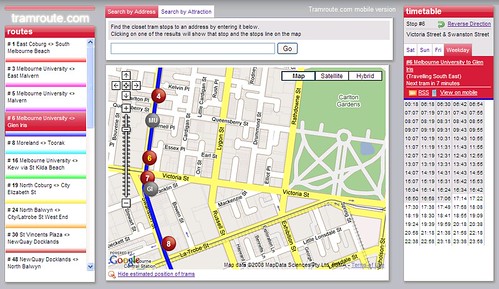
If you are a Melburnian, try out this website called www.tramroute.com. Just click on the tram line you are interested in, and choose "show estimated position of tram" - you then get to "spy" on your trams, and the dots representing trams actually move on the map! If you click on a particular tram stops, you also get to view the time table for that stop on your right. Very handy indeed.

It's not specifically mentioned, but I believe that the estimated tram position is based on the time table instead of the real-time tram tracking system as employed by Yarra Tram's Tramtracker. But oh well, it's so much fancier than the Tramtracker, and this website doesn't cost a single cent to use. :)

[via Melbourne Metblog]

2 comments:

Saturday, June 21, 2008

The Fool's Magic

Have you ever gotten these FWD:FWD:FWD:FWD:FWD: in your hotmail, facebook or friendster?

Find the error: 1 2 3 4 5 6 7 8 9 10 11 12 13 14 15 16 17 18 19 20

Did you know that 80% people could not find the error above? Repost this with the title "Find the error, its impossible", and when you click "Submit Post", the answer will be really obvious.
Forward this message to 50 friends in your contact list and you will have a new design in your profile!
Magic. When u hit the forward button, u'll see the person who views ur profile the most...try it...
I am sure many of us have followed those instructions, secretly wishing that the promise would come true. And many among us would also have counted 1 to 20 one hundred times, trying to find the nuanced abnormality that might have been missed in the previous attempts.

If you haven't realised, many of these things are simply "viral mails". Their very reason of existence is to propagate throughout the cyberspace via people's naivety, wasting people's time in the process. They are what we call mindless "memes", nothing more, nothing less.

We tell ourselves, "Hehe, I am going to find out the answer then challenge my friend and show off how smart I am". And ten minutes later, we give up and click "submit post", turning ourselves into the vector of the meme in the process.

The key to those memes' success is that nobody actually bothers asking or verifying with others when the promised magic doesn't happen. Everyone is afraid of being laughed at. They thought they are the only person around who has made stupid mistakes.

Essentially, this whole phenomenon is quite similar to the famed emperor's new clothes. They are the same old psychological manipulation with a modern twist.

3 comments:

Wednesday, June 18, 2008

Download Firefox 3 Now!

Download Day - English

Firefox 3, the latest version of my favourite browser has just been released! Go get it now!

Download it here.

If you are still using Internet Explorer, you should try out Firefox just for one or two days (and try out the add-ons while you are at it) to understand why I have ditched Internet Explorer since five years ago. For starters, check out some tips and tricks I wrote when Firefox 2 was released.

If you are using Opera or Safari... Well we shouldn't quarrel. :D

Update: Tada!

FFCert

13 comments:

Monday, May 05, 2008

RSS Feeds Now Available in Malaysian News Websites!

For a long time, I have been rather disappointed by the lack of RSS feed in local news. I know The Star does have RSS feeds, but its RSS is hidden in a separate page and is not auto-detected by Firefox or Internet Explorer. Most other news websites, notably all Chinese news websites, did not have RSS, making it hard for me to follow them daily. It's very disappointing as RSS has been widely used in all major international news websites for at least four years now.

To my surprise, when I visited SinChew's home page today, my browser detected the RSS feeds on the web page! Just go to any of the sub-categories (international, local, sports etc), and look out for the RSS logo.

I did some exploration, and found that Utusan also provides RSS feed, but Nanyang still doesn't feature it.

Note: If you have no idea what RSS is, visit this page for a brief explanation, and try out Google Reader for a feel of it. Needless to say, my blog has a RSS feed too, and if you read this blog regularly, you probably should try it out! :) This is how I read all my friends' blogs regularly.

0 comments:

Thursday, April 24, 2008

PicLens

If you haven't started using PicLens, you probably should:


It brings so much fun and novelty to viewing images online. Works on flickr (my photo album is there), google image search, facebook, picasa, friendster etc. Now it also lets you view youtube videos, although for some reasons it is not yet working on my computer.

Available for Firefox, Safari, and, eeer... yea, Internet Explorer.

4 comments:

Thursday, April 10, 2008

You Are Now Friends With...

I have always thought that Facebook uses the weirdest language I have ever seen:

Wee Loon Ong and Yee Pin Tan are now friends.
John Doe is now in a relationship.
You have 10 friends.
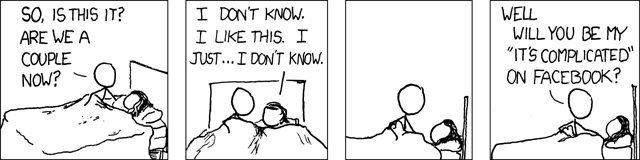
It's as if Wee Loon and Yee Pin were not friends before they added each other in Facebook; or they need Facebook's cap mohor to be friends. Facebook also seems to find a need to declare "you are now in a relationship", the same way as a pastor saying "you may now kiss your bride". It doesn't help when Facebook occasionally also announces "John Kay and Cecilia Aniston ended their relationship".

Today, Multiply (another social website) totally trumped Facebook by taking the language to an entirely different level:
Chang Ching Yew has invited you to be his brother.
This is getting more and more ridiculous, one day everyone will be doing this:

Facebook defines relationships. 'Yeah, we would have broken up last night, but the net connection was down.'
Have you had grouses or funny experience with quirks in social websites?

p/s: By the way, my mum hasn't accepted my invitation in Multiply.

9 comments:

Sunday, March 23, 2008

Windows Live Writer

I have always disliked Microsoft on principle. Apart from its Office suite and the relatively stable Windows XP, I think that most things that come from Microsoft are pretty much inferior to its alternatives. In particular, Microsoft Internet Explorer (especially the 6.0 version) tops the list of my most undesirable software.

But today I am going to highly recommend this Microsoft product: Windows Live Writer.

It's basically a blog application. It works on most blog providers, including Windows Live Spaces, Blogger, Wordpress and MovableType. It also works on blogs hosted on your own servers.

There are so many cool features in this application, it will be a hurdle for me to list it out while expressing my excitement at the same time.

In fact, heed me just once: If you have a blog, download the software here, install it, then type your blog address and password. You will be surprised by the first thing you see after that. More surprises will come when you start exploring its features.

Well done Microsoft Live Writer team. This software deserves lots of coverage. Oh ya, it's FREE.

(Needless to say, this post is typed in Windows Live Writer.)

7 comments:

Thursday, March 20, 2008

Duty Calls

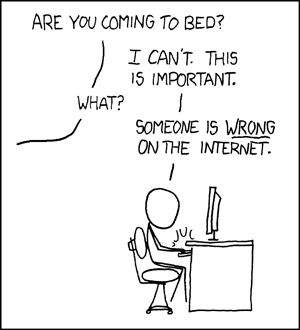
Caption: What do you want me to do? LEAVE? Then they'll keep being wrong!


The bad thing about Internet is, if you are an assertive person, you will soon find yourself hooked in the abundance of discussions and debates out there. You spend endless hours trying to prove your point to friends and strangers alike.

And you don't even know what you stand to gain from doing so. Sense of satisfaction? Assertion of intellectual superiority and maturity? Or as this comic succinctly points out, the "duty calls"?

I am one of them. And I need to learn more self control. 共勉之.


p/s: Do visit xkcd.com for many other great comics. The best comics out there for geeks.

7 comments:

Thursday, March 06, 2008

Geeks Talk

Some will understand this conversation, some will not, but here goes.

A: What is Internet Explorer?
B:The program you use to DL Firefox.
via Digg.

By the way, if you are interested, get the Internet Explorer 8 Beta. It's available now, and is a better browser than the previous versions. But no matter what, Firefox (and Opera) are still my preferred browsers. For the uninitiated, read my "review" of Firefox here.

5 comments:

Thursday, December 20, 2007

Surely You Are Joking, Google Translation

Google launched a translation bot for the Google Talk service. Basically you can just add a translation bot to your chat contact (e.g. en2fr@bot.talk.google.com would provide English -> French translation), and talk to him as with any other friend, and it will provide an instantaneous translation! Read more about this new feature here.

So Eric and I were trying out the English-Chinese translator, and here is the transcript:

me: We can talk in Chinese language
en2zh: 我们可以谈中国语文
me: It's funny
en2zh: 它的搞笑
me: Hahaha
me: Haha
me: It doesn't understand haha.
en2zh: 它不明白haha 。
me: the chinese translation is not too good
en2zh: 中文译本,是不是不太好
Eric: Sland doesn't work
en2zh: 岛屿行不通
me: for example
en2zh: 例如:
Eric: *Slang
en2zh: *俚语
me: read this
en2zh: 阅读这本
Eric: Hahah
me: Are you free tomorrow?
en2zh: 是你的自由,明天呢?
Eric: Let me try
en2zh: 让我试试
Eric: Holy cow!
en2zh: 圣牛!
Eric: Muahahahhahahaha
me: HAHAHAHAHAHA
me: Okay
en2zh: 还好
me: back to study
en2zh: 回到研究
me: back to studying
en2zh: 回到学习
Eric: Must say "go back to learn"
en2zh: 必须说, "回去了解" 。
en2zh: 嗯,不能
me: go back to learn
en2zh: 回去学习
Eric: Oh
en2zh: 哦
Eric: Go back to revise
me: Good luck for your physics!
en2zh: 回去修改
en2zh: 好运,为你的物理!
Eric: You totally made my day!
en2zh: 你完全说了我的一天!
Eric: I love this!
en2zh: 我爱这个!
me: The bad translation made my day too
en2zh: 坏的翻译了我的天太
me: haha
Eric: Esp Holy cow!
en2zh: 电除尘器圣牛!
me: Okay it's getting worse and worse
en2zh: 还好它的每况愈下
Eric: hold stomach big laugh!
en2zh: 持有胃大笑!
me: hey really gtg
en2zh: 嘿真的gtg
me: see ya!
en2zh: 见雅!
Eric: Bye
en2zh: 再见。
Can somebody tell me how in the world "esp" becomes 电除尘器?! 圣牛!

p/s: Happy 400th post in My Little Moments!

4 comments:

Wednesday, November 14, 2007

Of Wikipedia and Its Detractors

Wikipedia is an online encyclopedia where everyone can edit almost every single article in it. Over the years, it's been a rare gem of the internet. As a not-for-profit website without any commercial affiliation, it's become a surprisingly successful internet website. It has achieved tremendous popularity, consistently ranked in the top 10 result of most Google searches, and most amazingly, continued to prosper although it's funded only through annual fundraising campaigns.

As far as its popularity goes, Wikipedia has its own share of detractors. Due to its editable nature, Wikipedia's accuracy has long been a subject of debate. Some people compared it to the accuracy of the good ol' trusted Encyclopaedia Britannica, and found that the accuracy of both encyclopedias are rather comparable. However, some people rejected this controversial finding, citing the study methods as being inaccurate and biased towards Wikipedia. On the other hand, many people have been critical of Wikipedia's accuracy. For example, university lecturers routinely (and rightly) reject Wikipedia as a reference in any academic work. And people frown whenever someone quote a piece of information from Wikipedia.

While I agree with and recommend a healthy dose of skepticism towards the accuracy of Wikipedia, I hate it when people go too far in discrediting it. I especially dislike it when this happens:

Friend: Hey do you know who was the person involved in <an event>?
Me: Eerm, if I'm not mistaken, it's <someone's name>.
Me: *Go to Wikipedia and look it up*
Me: Yeah, according to Wikipedia it's <someone's name>.
Friend: Hey but it's Wikipedia! I don't trust Wikipedia. I never visit Wikipedia for any information.
On another occasion, when I was having a discussion about an issue online, I recommended people to read its Wikipedia article for an overview, and someone replied,
Why do you always recommend Wikipedia? Do you know that we are not supposed to trust it? For your information, if you cite Wikipedia in university, they will mark you down for that.
I personally think that those detractors have gone too far. When I recommend Wikipedia as a starting point for reading in an issue, I have never meant it to be the most authoritative and accurate source in the world. Nobody ever claimed it to be absolutely accurate and unbiased, and the encyclopedia itself admitted the fact too. It also openly advises the users that the information in the articles are not to be cited in any academic work, because of its nature.

Still, as an overview, Wikipedia is a great resource. For areas in which I am relatively knowledgeable, Wikipedia has been accurate most of the time. Medicine wise, most diseases and symptoms are accurately described, and most articles have reference from authoritative textbooks and websites. For mathematics, the articles have been well-written, despite being unprofessional and messy in certain articles. For recent events, it's one of the most updated, comprehensive and well-referenced source you would find online. Whenever there are some big massacre, bombing or other big-scale tragedies, Wikipedia always satisfies my need with referenced details.

At this point, you might want to quote vandalism and biased articles in order to rebuke my paragraph above. I concur that there are indeed occasional vandalisms and bias in Wikipedia articles. Therefore, it is best not to give it more trust than your newspapers and textbooks. Give it an equal amount of trust or mistrust as you would hold towards any traditional media or poster or books or brochures. Be aware that Wikipedia could be written by anyone, from a university professor to a primary school kid. Treat everything with skepticism.

Wikipedia is not as bad as some detractors made it to be. Some people go as far as saying that
Why would you donate to Wikipedia, seeing that it's actually inaccurate and is prone to vandalism?
I feel that those people do not get the spirit of collaboration and free knowledge. Wikipedia might not be the most authoritative resource out there, but in terms of the depth and the width of knowledge within, Wikipedia is second to none.

Treat it as a knowledgeable teacher, read it like an inquisitive kid, and doubt it as with any other information you gather in your life. You would gain much more precious knowledge from it than lose your "accuracy" from its occasional inadequacies. Above all, don't be haughty and tell people off when they bring up anything they learnt from Wikipedia. It's equivalent to telling people off "Hey it's just a brochure" when people tell you something from a brochure. I see it as a form of puffed-up intellectual superiority.

0 comments:

Friday, November 02, 2007

#1 in Google!

There is this fun game where you are supposed to find five different phrases which return your blog as the first hit.

Some results are quite surprising:

How do you find yourself in Google? :D

6 comments:

Tuesday, October 23, 2007

Donate to Wikipedia!

Wikipedia has just started its annual fundraising campaign, and I just donated a little bit to help the cause.

If you use Wikipedia and find it useful, help it grow and flourish by supporting it financially. Wikimedia (the organization behind Wikipedia) is a non-profit charitable organisation, and its operation is fully dependent on donation. If I could only donate my money to one cause online, I would choose Wikipedia. Look at what the donors have to say about Wikipedia here.

Donate to support one of the greatest websites in the world!

4 comments:

Monday, October 22, 2007

Of Forwarded Hoaxes And Spams

A few minutes ago I received one of those emails.

That email claimed that for every person I forward itself to, I will be paid 245 dollars by Bill Gates; and if that person forwards it on, every secondary forward will give me 243 dollars, every tertiary forward will give me 241 dollars, and so on and so forth. In the previous forwarded content, there are apparently some people saying very convincing things like:

OH my god, it worksss!!!! I just checked my bank account and it now has 9500 dollars in it!
Another person said
I got 4000 ringgit from Bill / Melinda Gates Foundation! Amazing!!
Seriously.

Bill Gates and his foundation may be some of the most generous philanthropist around, but they donate to AIDS and Malaria researches, not to spoilt kids like you and I.

Some people forward emails like this and some other types of urban legends, because, they say, there's no harm trying / spreading it. But it's wrong. There are great harms.

By forwarding such chain hoaxes, you literally give away your email addresses, and spammers can easily collect a large collection of email addresses when they receive a copy of such emails. If you forward such emails, don't complain when you receive thirty Viagra and penis enlargement advertisements everyday - you gave out your email address merrily in the first place.

If you are concerned, here are some tips you could try to avoid spammers from collecting your email addresses in the future.
  • Don't write your email addresses in public web pages e.g. forum, blog, blog comments etc. Spammers run automated programs which trawl every single email address they could find in all web pages, so posting your email is like leaving your key in front of your house door.
  • If you have to leave email addresses in a web page, try to think of ways to rewrite it. E.g. abc [at] gmail [dot] com / doremi under yahoo / santaclaus--hotmail.
  • If you have friends who forward emails to you regularly, ask them to put your email address in the BCC column. That way your email address would not be shown to the others.
  • Don't forward emails. If you want to share something, post them on your blogs, Friendster bulletins, Facebook notes etc; but don't forward them if you could help.
  • If you receive unsolicited emails which offer an option to "unsubscribe" from the list, don't be tempted to do so. Depending on the sender, very often the "unsubscribe" link is just a lure to actually confirm that your email address is valid. And if you "unsubscribe", you might actually get more spams in the future because they now know that your email address is a good one.
  • Use Gmail. It doesn't exactly help you avoid spammers from collecting your address, but its spam filter is so effective that I haven't seen any spam for weeks.
  • If some spams slip into your inbox, use the "mark as spam" option instead of deleting it. It helps the email service provider identify spam better for everyone.
  • Unfortunately, if you already receive tons of spams everyday, there's not much you could do apart from setting up a new account, preferably from Gmail.
Try your best to protect your email addresses. In this age, your email address is as important as your mobile number, postal address, or your age - you don't want to give it to strangers and thieves.

3 comments:

Wednesday, October 17, 2007

Who Do You Blog For?

This post is adapted from my comment in this post.

For some reasons, people like hypothetical and dichotomous questions. In other words, we always enjoy discussing and debating questions such as "Given options A and B, what would you choose?".

There is a golden example which I am sure everyone is familiar with. I believe that at some stage, someone in a romantic relationship is bound to ask his / her partner:

Given your family (or relationship) and your career, what would you choose?
Another similar question is,
Between myself and your mum, who would you choose?
I am not sure about others, but I have always disliked this kind of this-or-that questions. Those questions simplify life into two black-and-white options, and while they are good for setting people to think about goals and priorities, there's never going to be a good answer to them. It's not as if there's a two-way on-off switch that must turns on one option and turns off the other. Different scenarios call for different decisions, and in each case, the two options are never mutually exclusive.

But still, some people enjoy a simplistic approach to this issue, and judge others (even their own partner) based on their answer to those questions. I find that a bit disheartening.

On an unrelated note, when it comes to blogging, there is a popular dichotomous question:
"Do you blog for yourself or your readers?"
There are some pretty polarised views regarding this issue. While some people pretty much take their blog as a personal sanctuary and care not about the readers; some people spend lots of effort crafting posts which cater to the readers' need, sometimes at the expense of their personal interests.

My personal answer to this question is, "it depends…" To put it shortly, I would say it depends on what you write the blog for, and how you derive gratification when you blog. :)

For some people blogging is simply a kind of emotional catharsis or a personal habit, and for them the readers’ number and responses are not in the back of their mind - in that they can simply "blog for themselves".

For some other people, while essentially their blogs remain as personal chronicles, a big part of satisfaction comes from the readership, the interaction between reader and themselves, the satisfaction of readers etc. In that case “writing for the readers” would indeed be of high priority.

So, should the readers be made the first priority in blogging? It's pretty much an individual choice, and is dependent on the aforementioned factors. For example, if you ask Kennysia to throw away the reader-orientated posts and write all for himself, he’s going to lose quite a lot of readers. But say if someone relies on blogs to vent his frustrations but is forced to avoid writing it because some people tell him “I don’t like to read your angry stories”, then it would beat his purpose of blogging altogether.

So I guess the self vs. readers issue of blogging is more of a shade-of-grey kind of thing… Everyone has their own balance, and with a healthy give-and-take between those two considerations, both the blogger and the readers should enjoy the blog at an optimum level.

At the end of the day, a blog is all about a blogger and his readers. After all, a written chronicle without the readers is just a diary (or a private blog, for that matter), not a blog.


Note to Wei Liang: This post is not directed to you, and when I say I dislike dichotomous questions, it's not a reference to your question. It's just my feeling in general to this type of questions. :)

Image Credit: A Conversation, by JeanFrancois

7 comments: